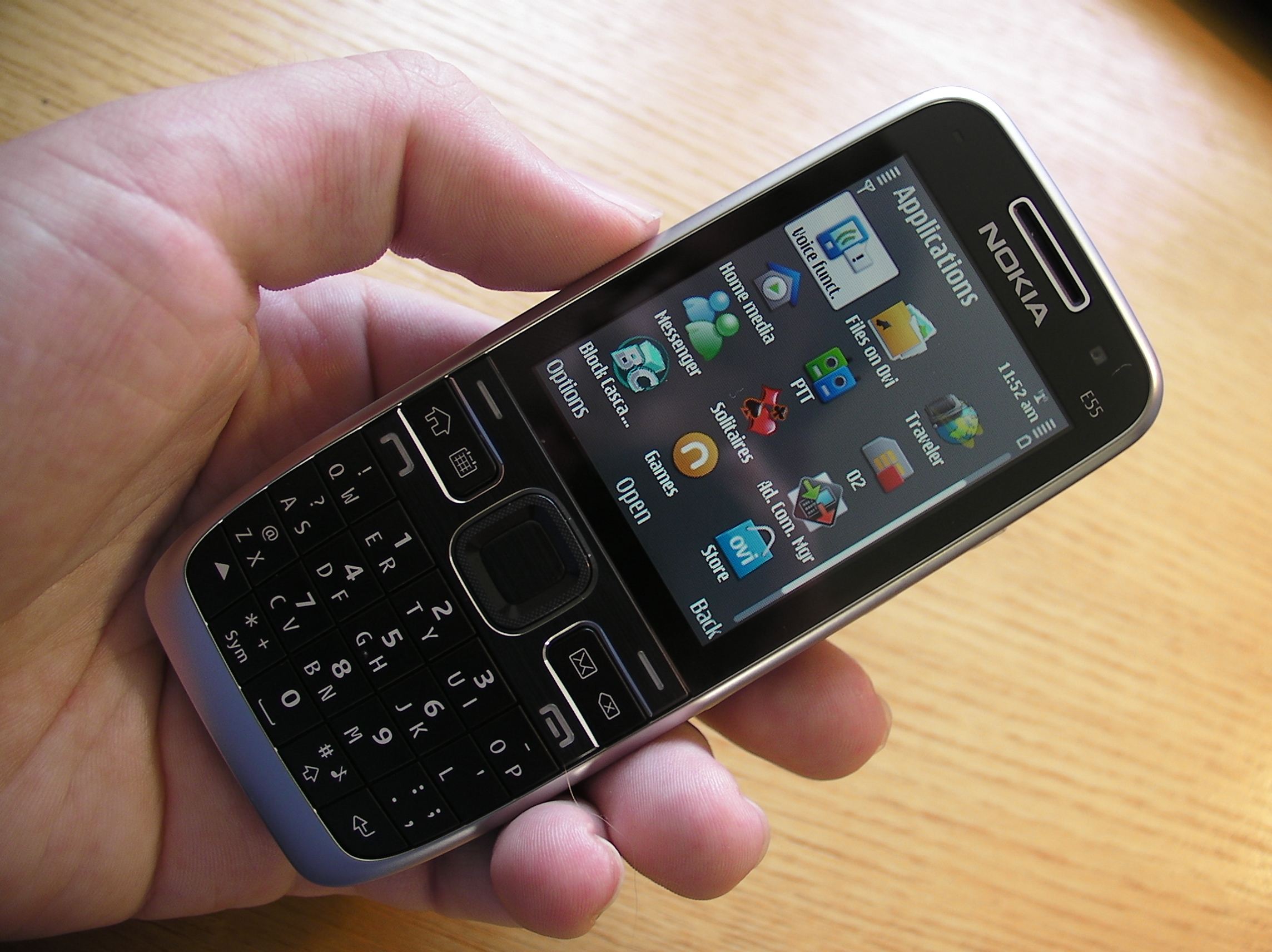
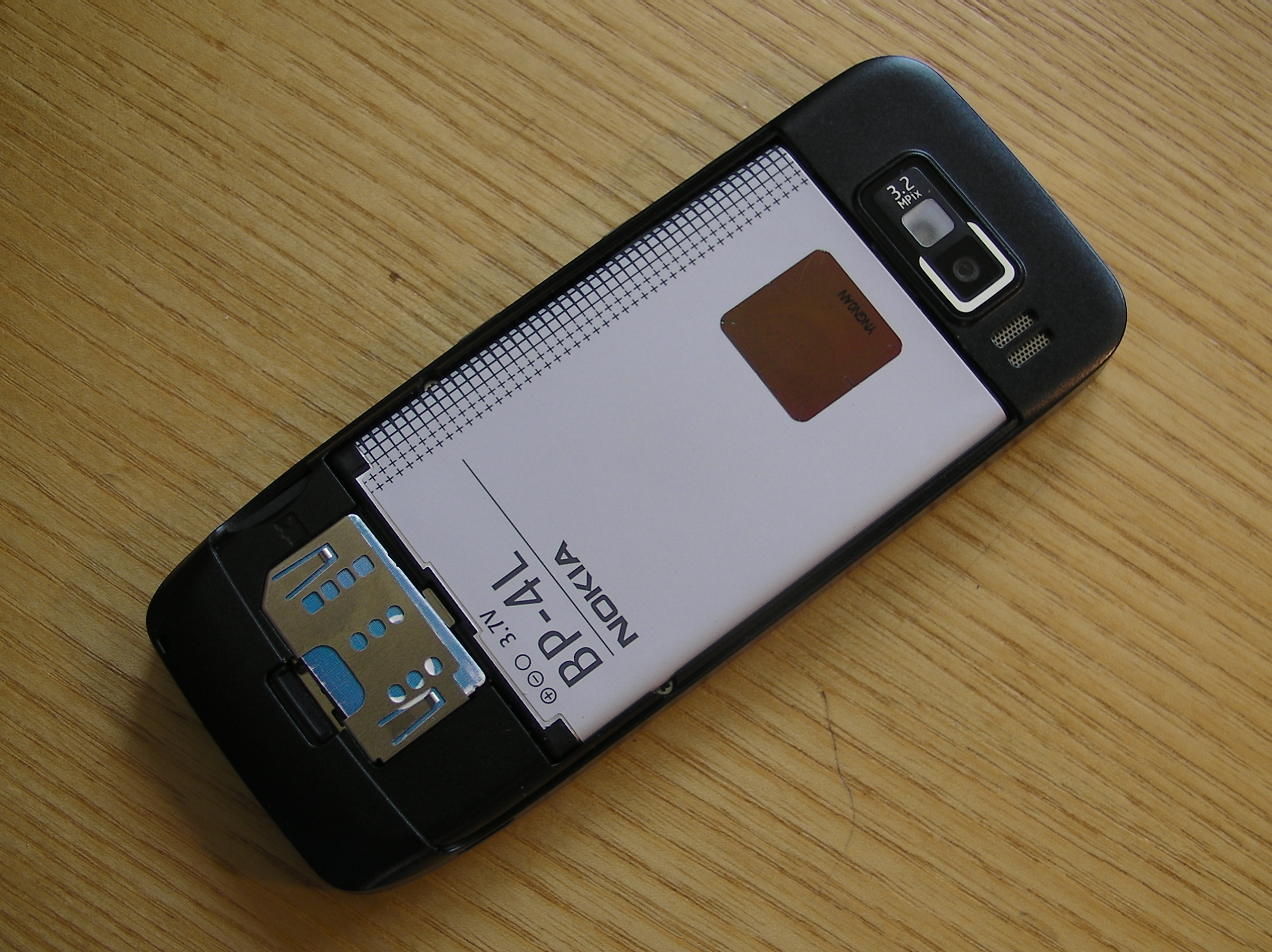
The E55 - ripe for pimping
This 'pimping' series is looking at hardware which is one or two steps from the cutting edge, yet with a little loving care can be brought well and truly into the 2010 smartphone world. In this case it's the turn of the super little Nokia E55, which unbelievably offers an almost full QWERTY physical keyboard plus a realistic
batterylife
of three
days of heavy-ish use, something which most 2010 units could only dream of.
The secrets to the E55's 'pros' are its clever use of a 'Compact QWERTY' design wherein each key is shared by two letters and the predictive software works out what you're trying to type with higher success rate than in the traditional T9-on-numeric predictive case; and the massive BP-4L 'hero' battery, rated at 1500mAh - utterly overkill for this
form factor in theory, but a design decision which means that you never EVER have to worry about battery life. (Possessing no less than four possible spare BP-4Ls, I reckon the E55 could last me through a
fortnight's holiday in the wilds without charging once!)
In addition, there's full compatibility with the free-forever version of the
Ovi Maps voice satnav solution, plus a 3.5mm audio out jack, with media control via a borrowed (or bought!) Nseries multimedia headset, and a decently loud mono speaker for listening to Internet Radio or podcasts while working around the house or garage.
Also evident in the form factor are a super d-pad and hardware (configurable) shortcut keys to (by default) an email mailbox and to Calendar. And the part plastic/part aluminium frame is one piece and pretty robust - there's nothing to really break so the E55 should last a lifetime.
The only real downside for the E55 is that the screen's only 2.4", a size dictated by the overall '
phone' form factor, but in use it seems bigger, as portrait 2.4" often does. However, it's a given that you're not going to want to do much web browsing or video watching on this device - the E55's form is perfectly suited to being a messaging, navigation and telephony-centric device - an
entirely different direction for a 'smartphone' from the current blogosphere wisdom, but a valid one in my opinion.
Techies will also point to the limited camera - 3 megapixels EDoF - and the limited RAM - about 44MB free after booting - but neither of these criticisms really have an effect on E55 operation. The
EDoF camera produces rather good snaps and is utterly point-and-shoot, with no possibility for messing up the focussing or for blurring the photo by not keeping the phone still (in good light), while the RAM is more than enough for everything except heavy web browsing - something you're better off not tackling using the native browser (see below for browsing solutions though).
Pimping the Nokia E55
Here are some of the steps I took to get the E55 ready for my use in late 2010. I'll absolutely admit that some of the settings and tweaks aren't for Mr Average who's new to S60 - he should go get an iPhone - but for me, at least, the following got me up and running fully.
Pick a theme - the Nokia Eseries have always shipped with the absolute most boring and generally unusable themes in the world - it's part of their 'charm'(!) - I therefore picked something with a little contrast and colour from my collection, in this case '
S60_Amoeba', used in
some of the screenshots below, though you'll have your own favourite, of course. I also like using '
Just Black'.
It's worth noting that the E55, like the E52, E63, E71 and E72, has a 'business'/'personal' homescreen 'mode' system. Personally, I find this a complete waste of time, since it's all very well having two distinct layouts and setups, but I either keep forgetting to switch the mode and so always end up looking at the 'wrong' layout or I switch successfully and then have to re-acquaint myself with where everything is. Better, for me at least, to have one single layout that does everything I need.
As shown below, the Eseries phones always come with an extensive selection of homescreen plug-ins - I find it distracting and it's worth going into Control panel>Settings>General>Personalisation>Standby mode>Mode settings>Homescreen applications to pick out just the ones you really want:
Set max brightness - the E55's display is transflective LCD, meaning great contrast outdoors and, because of the humungous battery, no worries over power drain - so crank the brightness up to maximum in Control panel>Settings>General>Personalise>Display and enjoy bright, vivid colours.
Adding podcasts – the number one thing I use my smartphone for. Rather inexplicably, Nokia Podcasting was missing in action on the E52, E55 and E72, though a few hardy souls have tried with a
home-baked hack. My solution is to use the S60 3rd Edition build of the open source
Symbian Podcatcher, which has a decent podcast directory and also has full import and export of OPML feeds, so it's not too strenuous to move all your subscriptions from one phone to another.
Podcast playback can be using the hardware d-pad or a multimedia hands-free control in a headset, both better control methods than having to stab at a touchscreen, in my opinion.
Syncing PIM data - we all do this, seemingly, in a different way. One way which often causes problems is to try and sync with Nokia's own Ovi. A more popular way is to use the built-in Mail for Exchange support to plug in the right settings here for Google's Gmail or your company email, in which case Contacts and Calendar come along for the ride. Me? I use Nokia's
excellent iSync support to sync with Address Book and iCal on my Mac and from there to other destinations, including various other phones I'm evaluating.
Gmail – the biggie for many professionals these days, this is close to being the perfect email solution – no worries over backups, viruses or spam, and access from any computer, phone or fridge set top box anywhere in the world. And the document sharing features make it ideal for integrating into an online, mobile office – this is 2010, you know? Gmail's ubiquity means that there are several ways of accessing it on a Symbian-powered smartphone, but in truth none are perfect. Nokia Messaging let me down for the umpteenth time on the E55, refusing to even complete setup, while the 'old' S60 mail client works well for push IMAP email but doesn't handle starred messages or allow online searching. Leaving us with the Mail for Exchange route (again), the mobile web version of Gmail (which actually works surprisingly well, in terms of having full functionality and attachment support) and the Java-based dedicated Gmail client, shown here and downloadable fromm.google.com. The latter's not perfect and you're thrown to a full-screen text editor for composing messages, but it has about 90% of the full Gmail functions with 90% of the convenience of a built-in application - and that's good enough for our purposes here. Still, as I say, you've got plenty of options!


Instant access - As an aside, I give myself instant access to Symbian Podcatcher and Gmail by assigning them 'long' keypresses on the E55's two application shortcut keys - very neat and quick - these are scenarios in which a physical keyboard or set of buttons are so much faster than messing around swiping through touchscreen icons.
Mapping and Navigation – the E52 (along with E55 and E72) benefitted from their inclusion in Nokia's
recent raft of 'free sat nav' updates to Ovi Maps - previous devices meant that users had to stump up a yearly admin charge - not a huge amount anymore, but a slight hassle. Sat nav and GPS on the E55 works well and the phone's diminutive size means that you can fit it into any car phone holder or cubby hole. Or even your jacket top pocket and it'll still work well. Again, the speaker means that instructions are clear.
Grabbing the free navigation update is a must for every E55 user, even if it does mean losing up to 15MB of your precious system disk C:
Web browsing - the built-in browser was cutting edge in 2007 but is looking a bit dated when faced with bloated 2010 web sites. Luckily, Opera Mini's on hand to help, doing a better job than ever (it recently got a big update to run as a native Symbian app) of tackling and compressing down heavy duty sites, with the usual multiple tabs, downloads and favourites-syncing. Run, don't walk to mini.opera.com and make this your preferred way of browsing the web. The exact install file you want is currently labelled 'Opera Mini 5.1 beta for Symbian/S60'...
Twitter – this is the first place I pick up on breaking news and on the thoughts of the tech experts in my field of view. On Symbian, there's the usual suspect
Gravity client if you're happy to part with £8 or so, but it isn't as wonderfully tactile as on the S60 5th Edition version and the fonts looks too small and likely to strain the eyes on a 2.4" display. Somewhat better on the E55 (and E52 etc.) is TweetS60, available in both free and Pro versions (the latter allows Twitpic image uploads and a few other functions), and shown below.


Secure database - having a password-encrypted store of passwords, PINs and ID numbers is an essential part of modern life for anyone who cares about ID fraud and security. You can't just use the same password on every service. And what about all those software activation and registration keys? In the Symbian world, I've always sworn by Epocware's
Handy Safe Pro, mainly because they offered a PC client that did faultless, two way sync to all my phones, all with the one purchase and registration code (though note that the very latest versions mean different codes for different devices, so you'll be reliant on Epocware support for generating codes if you switch devices - I'm guessing this was enforced by piracy?)
YouTube - being able to bring up most popular events in modern history, or virtually any music video, or archive clips of old bands, at a moment's notice, is something I've got very, very used to. On S60 3rd (and 5th) Edition-powered phones (though not, curiously, Symbian^3), there's Google's dedicated YouTube client (downloadable from the Ovi Store or from m.google.com, now up to v2.4.4, including logging in to access favourites, etc.) or you can use the mobile site - or even desktop site, with embedded Flash video, if you really like. Plenty of options, though I usually go with the client. This runs acceptably on the E55, at about 12 to 15 frames per second (enough on a QVGA display) but you're limited by screen real estate for any meaningful watching, of course. Still, fine for down the pub argument closers....


Music playback - having my phone as my primary mobile music device has been part of my life for the last 6 years and the experience (gapless playback apart) on Nokia smartphones is usually very good. As mentioned above, in the context of podcast playback, I use the E55 with a multimedia headset with its own playback controls, borrowed from an Nseries device! You can also buy these headsets separately, e.g.
here on Amazon, for just a few pounds - they transform the humble E55 (and E52/E72) as a personal music device.
 Torch
Torch - a seemingly trivial function, but one that's very important to me. Yes, it's possible to simply use the screen display on maximum brightness, but that just gives a general glow - I've loved phones and phone apps that let me use the camera LED as a real torch. Starting with the likes of the Nokia 5500 Sport and N93 and now with the (commercial, £1.50)
PhoneTorch utility from the Ovi Store. Although the E55 only has the one LED, it still makes a half decent emergency torch on a dark night.
Games - with a small screen and limited processor, the E55 is never going to be great for games, best used just while waiting in line on journeys or for my family in the supermarket. There's no shortage of casual games for Symbian, but my favourite on the E55 is
Micropool.
Movies - like most people, I keep a quantity of video on my phone's memory card - favourite rock music live clips, that sort of thing. The E55 (and E52/E72) does surprisingly well here, with smooth playback of even videos encoded for VGA or similar, and in a variety of MPG and WMV formats. So don't be afraid to try your movie collection on the small screen - the limitation will be your eyes on the 2.4" display rather than the processor or video playback software!
Google Maps - the latest v4.1.1, complete with Google Buzz, voice searching and Latitude, works very well on the E55, like Ovi Maps it's a no-brainer to install from m.google.com. Even if you end up using Ovi Maps most of the time, Google Maps makes a great backup, for looking up businesses and obscurities that Ovi Maps might not have heard of.
Radio, radio - in the mass of applications that come bundled with S60, it's easy to overlook Internet Radio, but it's there, built-in. Start up the generic 'Radio' application and you get the choice of FM or Internet as the source. As ever, Nokia Internet Radio has tens of thousands of Internet-hosted radio stations - if you're within range of Wi-Fi then you have all the radio you'll ever need. And if your data tariff is up to it, you can stream this radio anywhere you like.
Take 10 minutes to re-order things
It's also well worth noting that the default layout and organisation of application icons on the E55 is very skewed towards business use. Take 10 minutes and put the application shortcuts you use most in the places where you'll find them the easiest. For your most popular apps, put their shortcuts in the 'standby' screen app bar. For others, consider putting them in the main S60 menu 'root' - or at least in a prominent position in the appropriate folder (e.g. 'Games'). Yes, there's a lot to move around, but you'll make yourself much more productive and will easily recoup that 'lost' 10 minutes.
__________
The E55, first available in summer, 2009, isn't quite old enough yet that second hand prices have dipped below £100, though we're not far off. In part, this is due to the qwerty status and the eligibility for free Ovi Maps Navigation - making each phone a world sat nav too.
Typical new prices (i.e. with warranty) are around £190, depending on where you look online. The sister device, the E52, can be found second hand for less than £100, though as usual make sure you get the version with the black keypad, otherwise you'll have key backlight visibility problems.
With the caveat that you need to be willing to put a little effort in (above), this tiny smartphone can supply a relatively huge amount of functionality. The Nokia E55 has just been pimped!
Steve Litchfield, All About Symbian, 20th November 2010
 The MOTOROLA FLIPOUT with MOTOBLUR features a touchscreen that flips vertically to reveal a full physical QWERTY keyboard – perfect for sending quick and precise messages. MOTOROLA FLIPOUT is powered by Android 2.1, the FLIPOUT with MOTOBLUR is fully customizable with resizable widgets, homescreen customization, and access to the Android Market. The MOTOROLA FLIPOUT is lightweight, making it pocket-friendly, packs a three megapixel camera and battery manager to help you keep the communications flowing.